 Mehmood Ur Rehman Qureshi
This task turns the first page of a public product catalog into a CSV with four columns: full product title, displayed price, availability and product URL. MCP Browser Extension reads the page in the owner's real Chrome. The agent checks the returned records and saves the file locally.
It is a small example for developers or operations teams who need a reviewable table from a page. The source is Books to Scrape, a practice website that invites extraction tests. Its prices are demo values, not real shopping offers. This run collects the first 20 records only; the source contains 1,000 products across 50 pages.
The prompt
Use a prompt that defines the scope and the checks:
Use MCP Browser Extension to open https://books.toscrape.com/
in a new background tab. Read the first 20 product records only.
Return full title, displayed price, availability and absolute product URL.
Preserve page order and full names, including commas and apostrophes.
Check for missing fields and duplicate URLs.
Spot-check the first, eleventh and last records on their detail pages.
Save a correctly quoted UTF-8 CSV and read it back to verify 20 rows.
Do not follow pagination or add anything to the basket.
The guide to extracting website data with MCP explains the reading tools and configuration. For this demonstration, eval was enabled to read the fields within each product card. Scoped HTML plus local parsing is an alternative when you prefer to keep eval disabled.
Watch the recorded workflow
The video condenses the workflow for review. Its runtime is not a measurement of extraction speed. Browser reads, scrolling, screenshots and the verification download used MCP Browser Extension. Narration and layout were added during editing.
What the agent did
1. Read the page and establish the limit
chrome_status confirmed that the extension was connected. task_new created a folder for the run's history and artifacts, and tab_new opened the catalog with active: false.
The first get_text read returned the page's “showing 1 to 20” count, the demo warning and “Page 1 of 50.” That established a clear stopping point. No next-page link or basket button was clicked.
2. Inspect a product card
get_html on article.product_pod showed that the first card's visible title was shortened. Its link carried the complete title in an attribute. The same card also contained the price, availability label and product link.
The agent used eval to read those four values from each of the 20 cards. Whitespace in availability labels was collapsed, and relative links became absolute URLs through the link's href property. The field values came from the loaded page; missing text was not filled from memory.
extract_links on the product list, with deduplication enabled, independently returned the same 20 product URLs. That mattered because each card links to its product through both an image and its title. Counting every anchor without deduplication would overstate the number of products.
3. Check three detail pages
A separate background tab opened the first product, then navigated to the eleventh and twentieth products. get_text scoped to .product_main returned each heading, price and availability. All three matched the listing records:
| Product | Listing price | Detail-page check |
|---|---|---|
| A Light in the Attic | £51.77 | Full title, price and in-stock state matched |
| Starving Hearts (Triangular Trade Trilogy, #1) | £13.99 | Full title, price and in-stock state matched |
| It's Only the Himalayas | £45.17 | Full title, price and in-stock state matched |
The detail pages also showed stock quantities. Those quantities were outside the requested schema, so the export retained the listing's “In stock” text. Only these three detail pages were opened; the check does not claim that all 20 product destinations were individually visited.
4. Create and reopen the CSV
A second eval expression built quoted CSV text from the page records and returned it through MCP. The agent saved that text locally as books-catalog-page-1.csv, using UTF-8 with a byte-order mark for spreadsheet compatibility. A local CSV parser then read it back and compared every field against the extracted records.
That round trip preserved the comma inside the eleventh product's title and the apostrophe in the final title. The validation also checked required fields, unique URLs, displayed pound prices and formula-like field prefixes. All 20 records passed these checks.
A separate local HTML report displayed the returned rows for visual inspection. Its download link served the saved file, and download_file, given the explicit local URL, downloaded a verification copy through the extension. This is a report created for the demonstration, not a new export feature in the product.
The result
The completed file contains 20 rows and four columns, with 20 unique product URLs and no missing fields. Prices retain their pound signs. Every row retains a source link, and the order matches the first catalog page as captured on 16 October 2026.
Download the checked demo CSV.
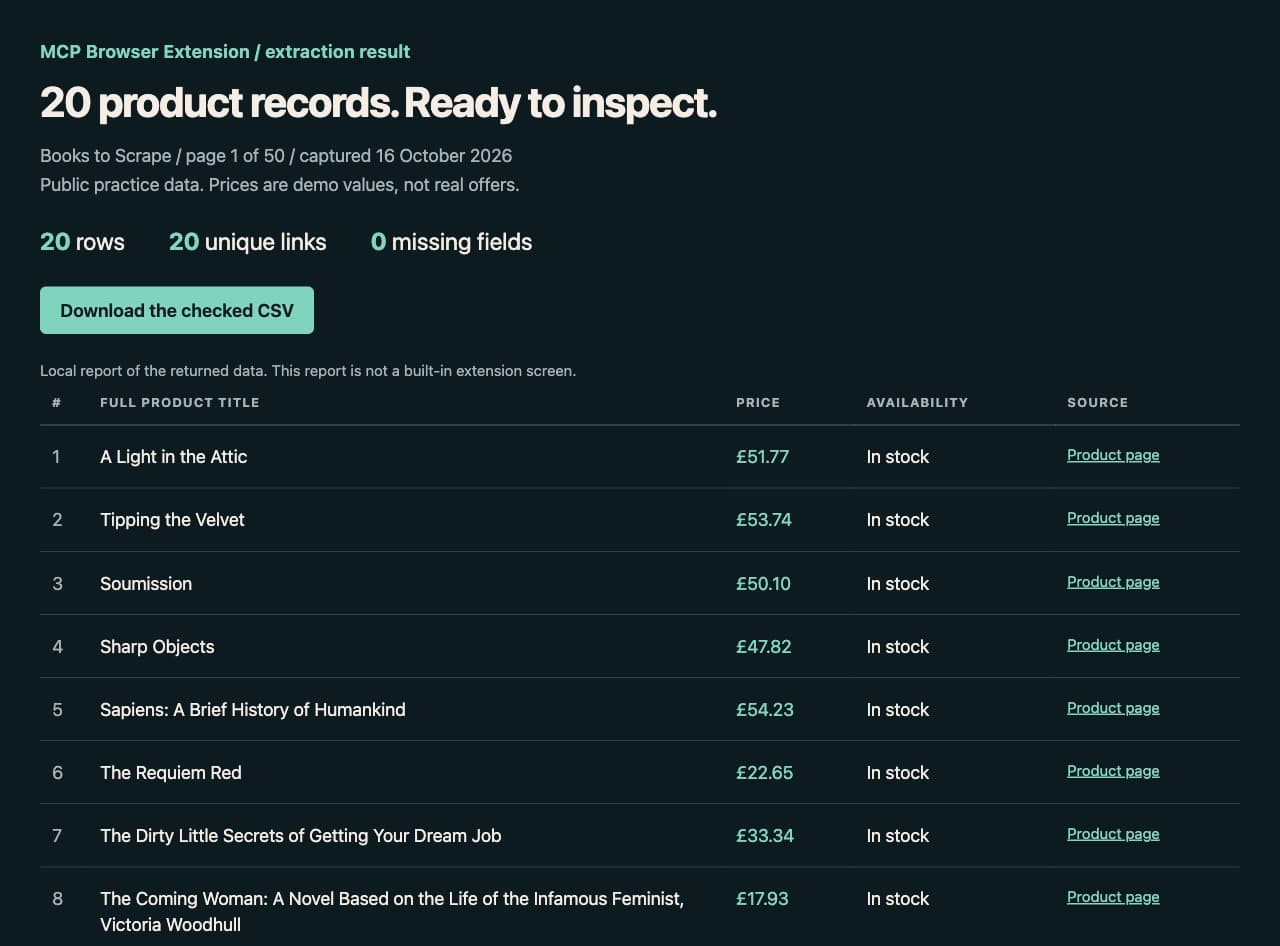
The local result report displays the returned data. It is separate from the source website and the extension's own interface.
The captures contain no private accounts or customer records. Cover images were hidden before recording because the task only needed text fields. Screenshots and video preserve the page's product labels and values; the article provides full names from the extraction where the original cards shorten them.
Try it in your Chrome
Complete the quickstart, allow books.toscrape.com, and enable mutations for opening tabs. Enable eval only if you want to use the demonstrated page-JavaScript approach. Then give your agent the prompt above and inspect the file it returns.
If the page structure changes, have the agent inspect the new markup before selecting fields. If a value is missing, keep the cell empty and report the problem. A readable CSV with a disclosed gap is more useful than a complete-looking file containing guessed data.
For the reverse workflow, see fill a web form from CSV. That example starts with a local row and checks the resulting form before submission.
Variations
You can narrow the task to one category or add another observed field. For a multi-page collection, specify a page limit and deduplicate across pages by product URL. Keep the capture date with each run if you intend to compare changes later.
For a real catalog you manage, compare the browser result against your own export or API. This practice site's random prices should not be used to test market pricing, profitability or stock forecasts. Its role here is to demonstrate reading, preserving and verifying page data.
FAQ
Did the agent extract all 1,000 books?
No. It collected the first page's 20 records and stopped. The CSV is deliberately scoped to that page.
Where did the full product names come from?
They came from the title attributes on the catalog's product links. Three selected names were also checked against product-detail headings. No shortened title was completed by guessing.
Is the result report part of MCP Browser Extension?
No. It is a local page created to inspect the extracted records. The extension supplied browser access; the agent's host saved the CSV and built the report.
Can I reuse the sample CSV?
It is provided as practice data for following this demonstration. Keep its Books to Scrape source and first-page scope with it. Its prices and availability belong to a demo catalog, not a real retailer.
Set it up in a few minutes