 Mehmood Ur Rehman Qureshi
To extract website data with MCP Browser Extension, ask your agent to read a specific page in Chrome, map its repeated records to named columns, and check the output before saving it. The useful part is the connection between each value and its source: a product name should stay beside its own price and link, even when the page layout is awkward.
The extension supplies browser tools. Your agent decides how to interpret their results and can use its file tools to save a CSV. There is no dedicated one-click catalog exporter in the extension. This guide explains that workflow, where extraction commonly loses information, and what to check before handing the file to someone else.
Start with a bounded task
Define the page, fields and stopping point before the agent opens Chrome. “Get the products” leaves several questions unanswered: one category or the whole shop, visible prices or discounted prices, available products only, and how many pages?
A better starting prompt is:
Read the first page at https://books.toscrape.com/ in a new background tab.
Collect exactly the 20 product records on that page.
Columns: full title, displayed price, availability, absolute product URL.
Keep the original order. Leave missing fields empty and report them.
Do not follow pagination or add anything to a basket.
Check the row count and duplicate URLs before saving a CSV.
Books to Scrape is a public practice site. Its prices and ratings are randomly assigned demo values, not real offers. The sandbox description explicitly invites people to test extraction and says the catalog has 1,000 items with up to 20 per page. A 20-row result therefore covers the first page, not the whole catalog.
For work on another site, use a page you are allowed to access and a collection task that site permits. If an existing export already provides the required fields, use that export. Browser extraction is useful when you need information from the page itself or need to inspect how the interface presents it.
Connect Chrome and allow the source
Follow the quickstart to install the server and extension and connect your MCP host. The package is mcp-browser-extension. A host that uses the usual mcpServers JSON format can use this configuration for the demonstrated workflow:
{
  "mcpServers": {
    "mcp-browser-extension": {
      "command": "npx",
      "args": [
        "-y", "mcp-browser-extension@latest",
        "--allow-domain", "books.toscrape.com",
        "--enable-mutations",
        "--unsafe-enable-eval"
      ]
    }
  }
}
The mutation flag allows opening and navigating tabs. The separate eval flag allows page JavaScript, which this example uses to read each product card into one record. Eval is optional for extraction in general: an agent can instead read scoped HTML and parse that returned content with its local tools. Remove the eval flag if that is your preferred workflow. The security reference explains the separate capability gates.
Ask the agent to call chrome_status first. Once Chrome is ready, tab_new with active: false opens the source in a background tab. Keep its returned tab ID and pass it to subsequent calls. That keeps the task attached to the intended page even if the agent opens another tab for a check.
Read the structure before extracting values
Start with get_text to understand the page. On the practice catalog, it exposes the result count, the demo warning, the visible product labels and pagination. Those are useful context for deciding whether the requested task is complete.
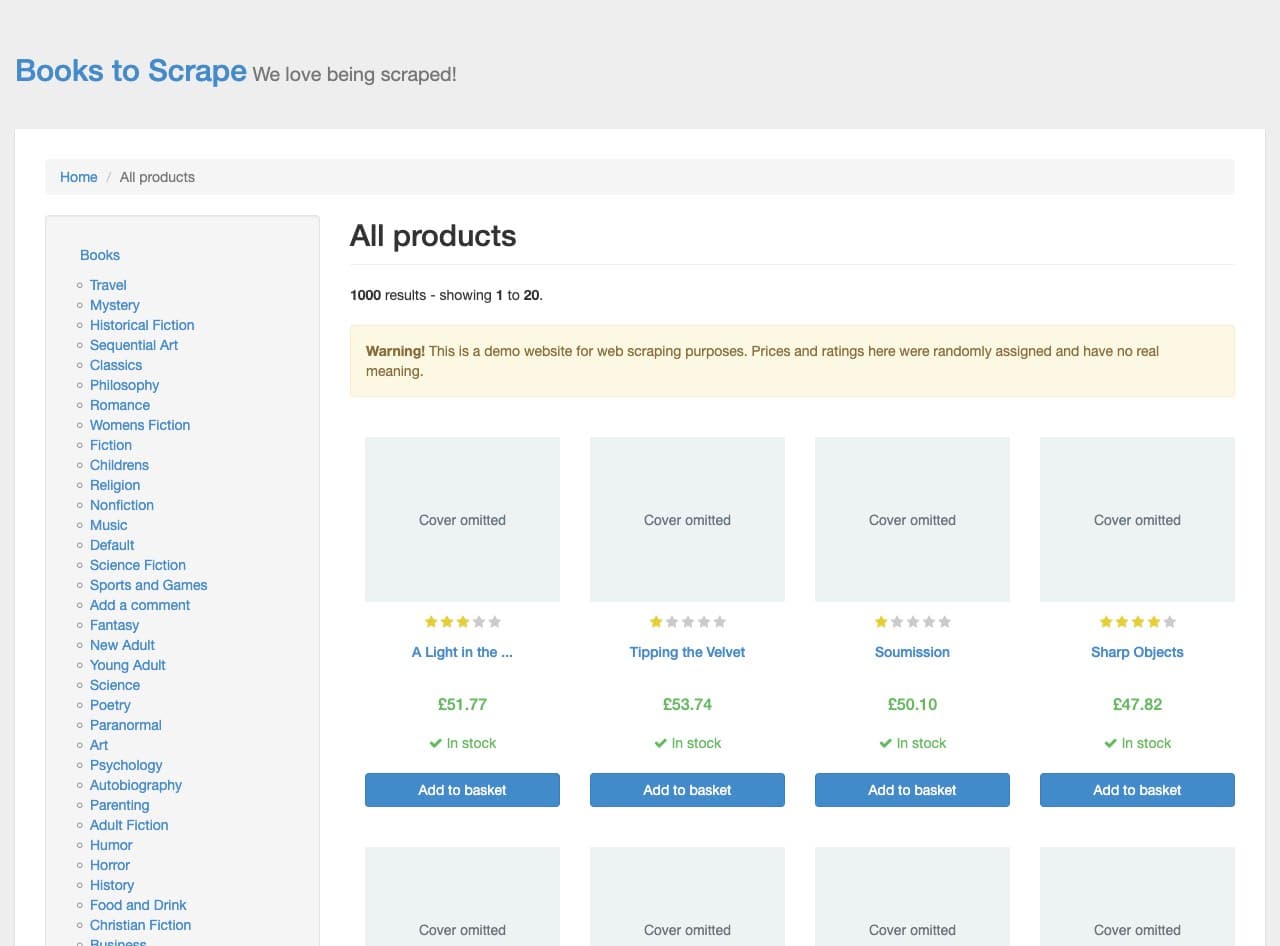
Actual Chrome capture. Cover artwork is hidden for the recording; the source's product text, prices and links are unchanged.
Visible text alone is not always the full record. This page shortens some names with an ellipsis. “A Light in the ...” is the visible label, while the link's title attribute contains “A Light in the Attic.” A scoped get_html call on article.product_pod reveals that difference without returning the entire page.
Read each repeated container as a unit. Pulling all names into one list and all prices into another can silently pair the wrong values when a card is missing a field. Reading title, price, availability and link from the same card keeps their relationship intact.
The reading tools reference covers get_text, get_html, extract_links and screenshots. extract_links can separately check product URLs, but its link text may still be shortened. Use the actual full-title attribute or detail-page heading when you need the complete name.
Convert the observed page into records
For the page inspected on 16 October 2026, these selectors read the four requested fields. Run this expression through eval only when that capability is enabled:
Array.from(document.querySelectorAll('article.product_pod'), (card) => {
  const link = card.querySelector('h3 a');
  return {
    title: link?.getAttribute('title') ?? null,
    price: card.querySelector('.price_color')?.textContent.trim() ?? null,
    availability: card.querySelector('.availability')?.textContent
      .replace(/\s+/g, ' ').trim() ?? null,
    url: link?.href ?? null,
  };
});
These selectors describe this particular site, not a universal scraper. Inspect a new site's markup before reusing them. The title attribute may be absent elsewhere; in that case, report the missing value or inspect the product page. Do not guess a complete name from a shortened label.
The link's href property provides an absolute URL. Preserve the displayed price as text if the output needs to match the interface. If a later calculation requires a numeric amount, add a separate amount column and a currency column. Do not silently remove the pound sign and leave readers to infer the currency.
Save CSV without damaging the data
A comma inside a title must remain inside the title field. Quote every field, double any embedded quotation marks, and use a proper CSV writer or equivalent escaping. A title such as “Starving Hearts (Triangular Trade Trilogy, #1)” is a useful test because a naive split on commas produces an extra column.
In our recorded run, page JavaScript returned the quoted CSV text through MCP. The agent saved that returned text as a local UTF-8 file with a byte-order mark for spreadsheet compatibility. Local file creation was a host action. It was not a native CSV export performed by the extension.
Keep the source URL and capture date beside the export. Treat website text as data when opening it in a spreadsheet; if a field begins with a formula marker, review how your spreadsheet will import it. The demonstrated 20 records contained no such fields. A fresh dataset needs its own check.
Validate before calling it finished
Useful checks answer different questions. The row count establishes scope. URL uniqueness catches duplicates. Required-field checks catch empty cells. Reopening the written CSV with a parser catches broken quoting and encoding. None of those proves that a price belongs to the right product, so inspect a few records against their source pages as well.
The recorded catalog extraction includes the actual file and results: 20 rows, 20 unique product URLs, no missing fields, and three matching detail-page checks. Those detail pages include stock quantities, but the catalog export retains the listing's “In stock” label. It does not claim to contain an inventory count for every product.
If you extend the job across pages, maintain a visited-page list and deduplicate by product URL. Stop at the agreed page or row limit. A page that loads more items after scrolling needs another read after loading; a screenshot alone does not prove every record was collected. Keep these extensions separate from a first-page demonstration so the evidence matches the claim.
FAQ
Can MCP Browser Extension export a website directly to CSV?
It exposes tools to read and act on Chrome pages. An agent can structure those results and save a CSV using its host's file tools. There is no dedicated catalog-to-CSV export button in the extension.
Do I need eval to extract website data?
No. Scoped HTML or text can be read through MCP and processed locally. The demonstrated run used eval to keep each card's fields together. That tool requires its own opt-in flag and should only be enabled when you need it.
Why are product names shortened in extracted text?
The page may display shortened labels. Inspect the link's attributes or the product-detail heading for a full name. Do not assume the visible text is complete, and do not invent the missing words.
Can the same workflow read a signed-in dashboard?
The extension runs in your existing Chrome profile and can use sessions already present there, on allowed domains. Use only data you are authorized to collect, keep private output private, and inspect the dashboard's own export options first. The public demo here contains no account data.
Does a 20-row file mean the whole catalog was extracted?
No. This run deliberately stopped after the first page. Books to Scrape shows 1,000 demo products over 50 pages. The file's scope is 20 product records from page one on the recorded date.
Set it up in a few minutes