 Mehmood Ur Rehman Qureshi
A remote MCP client cannot reach a server listening only on your laptop. MCP Browser Extension's --tunnel mode gives that local server a public HTTPS address, while the browser itself stays on your computer. The client sends tool calls through the tunnel; the Chrome extension carries them out in the Chrome profile you paired.
That distinction matters. You are connecting a remote client to an existing browser, with that profile's sessions and tabs. You are not moving Chrome to a cloud machine. Your computer, Chrome, the extension, and the tunnel process all need to remain available during the task.
This guide covers the tunnel feature shipped in version 0.9.22. The quickstart covers installing and pairing the extension first. If you want to see an actual result before setting it up, read the recorded release-page check.
The route a browser request takes
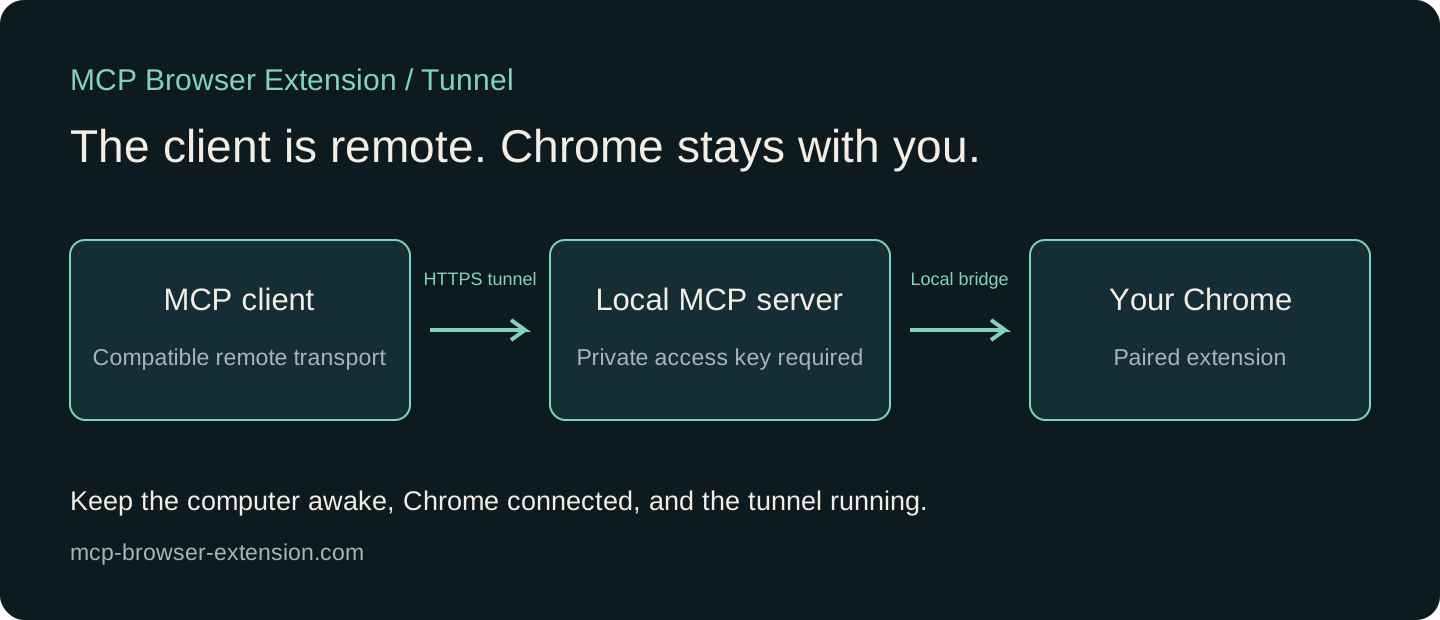
There are two separate connections. Between your client and the server, the remote transport is Streamable HTTP. Between the local server and Chrome, the extension uses the existing local browser bridge. Adding a tunnel changes how the client reaches the server; it does not remove the extension or replace the browser session.
The server's HTTP listener binds to 127.0.0.1. By default it uses port 38018, which you can change with --http-port. With --tunnel, the server also starts the separately installed cloudflared program and prints a connector URL. The project changelog records these options and their release.
This is useful when the MCP client runs somewhere other than the browser computer: another workstation, a hosted agent, or a compatible web client. Check that your chosen client supports the server's remote transport and access-key arrangement. A client that requires an OAuth authorization flow is not interchangeable with one that accepts this private URL.
Install the prerequisite and start the server
First install MCP Browser Extension from the Chrome Web Store and pair it with the local server using Connect. Complete that part before diagnosing a remote connection. A working HTTPS endpoint does not establish that a browser is paired behind it.
On macOS, install the tunnel program once:
brew install cloudflaredOn Windows, the corresponding installation command is:
winget install --id Cloudflare.cloudflaredThen start a session for one specific public site:
npx -y @mehmoodqureshi/chrome-mcp@latest \
  --tunnel \
  --allow-domain mcp-browser-extension.com \
  --enable-mutations
The domain is an example you can use to reproduce the release-page check. Replace it with the host your task actually needs. Opening a new tab and navigating are browser mutations, so this walkthrough includes --enable-mutations even though its final task only reads a page. The permissions guide explains why those two decisions are separate.
Keep this terminal running. The server prints the address after requesting a Quick Tunnel. If the tunnel service times out, wait for the reported retry or error. A printed address is the start of a connection check, not evidence that the browser task has succeeded.
Connect a compatible remote client
The complete connector address has this shape:
https://<temporary-host>.trycloudflare.com/mcp/<remote-key>Those are placeholders, not a working connection. Copy the complete address from your own terminal into your client's remote MCP server configuration. For clients that can send an authorization header, the server also accepts /mcp with the key in a Bearer header. Its startup output includes the corresponding command for Claude Code.
The final path segment is a credential. Keep it out of screenshots, shared documents, issue reports, public video descriptions, and source control. Someone with the complete address can make requests under the server's enabled permissions. Selecting a client's “No authentication” option for a key-bearing URL, where supported, does not mean the endpoint lacks a key; it means the client is not adding a separate authentication flow.
The server stores its remote key in ~/.chrome-mcp/remote-key by default. Restart with --rotate-remote-key when you want previous keys to stop working. This is a different secret from the local extension's pairing token, so do not substitute a token from handshake.json into the remote URL.
Verify one small browser task
Begin with a public page and a result you can inspect. A useful first prompt is:
Open https://mcp-browser-extension.com/docs/changelog in a background tab.
Read its newest release heading and the first feature summary.
Return the version, release date, source URL, and what you observed.
Close only the tab you created.
The underlying steps are tab_new, get_text, and tab_close. A screenshot can document the page state, but it does not replace reading the result. If the page redirects to a login screen, asks for extra permissions, or loads an error, report that state instead of inferring the expected release.
In the recorded check on 14 October 2026, an SDK client reached the public HTTPS tunnel and read version 0.9.22, dated 2026-10-13, from the live changelog in the paired Chrome. The client and Chrome were on the same Mac; traffic used the public tunnel address. This verified the request route, not a second-device or mobile-client setup. The use case includes the actual browser steps and their output.
Choose a temporary or stable address
The built-in --tunnel option uses a Cloudflare Quick Tunnel. Its hostname changes when a new tunnel is created, so a saved connector may need updating after a restart. Stopping the tunnel process removes that route. A sleeping or disconnected browser computer cannot continue serving browser work simply because the client is elsewhere.
Cloudflare describes Quick Tunnels as a testing and development feature, with no uptime guarantee. Its documentation also lists a limit of 200 in-flight requests and says Quick Tunnels do not support Server-Sent Events. The finite MCP requests in this recorded run completed, but that observation is not a guarantee for long-lived streaming or every client's reconnect behavior. Cloudflare's Quick Tunnel documentation explains those limits.
For a stable hostname or a different network arrangement, --http starts just the local HTTP service. You can then arrange your own tunnel or reverse proxy. Keep the remote key requirement and evaluate that route's authentication and transport behavior. This guide does not configure or verify a production deployment for you.
FAQ
Does the tunnel launch Chrome on a server?
No. It exposes an HTTP route to the MCP server on your computer. Browser actions still run through the extension in your paired Chrome profile.
Can I close my laptop after connecting?
The browser computer must stay awake and connected, with Chrome and the server available. The tunnel does not keep a sleeping laptop working remotely.
Why did my connector stop working after a restart?
A new Quick Tunnel gets a new hostname. Check the newly printed URL, whether the remote key changed, and whether the browser is still paired before changing other settings.
Is this an OAuth login server?
This implementation accepts a remote access key in the URL path or a Bearer header. Use a compatible client configuration; do not assume it implements an OAuth consent flow.
Set it up in a few minutes